
Imprint: The content of this blog entry is based on VR experiments in the context of projects carried out in the scope of the authors masters degree studies at FHNW University of Applied Sciences and Arts Northwestern Switzerland under the supervision of Prof. Dr. Doris Agotai.
Interaction and UI design for virtual environments are still a rather novel discipline where not many standard design patterns have been established yet. This leaves much room for exploration and therefore present an interesting challenge. In this article we will look into theory and current research on this topic and investigate if proven principles from 2D interaction and UI design can be transferred to virtual space.
VR pioneer LaViola et al. write in the introduction of their reference book on 3D User interfaces that „although we live and act in a 3D world, the physical world contains many more cues for understanding and constraints and affordances for action that cannot currently be represented accurately in computer simulation. Therefore great care must go into the design of UIs and interaction techniques for 3D applications. It is clear that simply adapting traditional WIMP interaction styles to 3D does not provide a complete solution to this problem. Rather, novel 3D UIs based on real-world interaction or other metaphors must be developed.“ [1] With this statement the authors point out the importance of developing adequate interaction patterns and menu designs for virtual environments.
Basics of spatial interaction design
Concerning types of interaction, 3D interaction theory distinguishes between direct user control, virtual control and agent control. In the first case, interface gestures that mimic real world interaction are applied meaning that the user directly interacts with a virtual object as he would with a physical object. Interaction fidelity is a term that is frequently used in this context to describe the objective degree of exactness with real world actions [2]. An example for high interaction fidelity is the isomorphic outlook, where strict geometrical, one-to-one correspondence between hand motions in the physical and virtual worlds is suggested, reasoning that more natural interaction patterns are better for users. Yet this is often impractical and ineffective because of user’s limitations such as arm length meaning he/she can only reach items within that limited radius. In the second case of virtual control, system control is effected by forms of indirect manipulation, for instance by the means of menus, commands, physical controllers or laser pointers among many others.
Another general question regarding interaction design is whether interactions should be effectuated single handed (unimanually) or with both hands (bi-manually) and in the latter case, if the actions of the two happen synchronously or asynchronously and an additional distinction according to Guiard’s framework for classification is made depending on the role of the dominant and the non-dominant hand. Studies have shown that bimanual input in particular has the potential to allow users to perform tasks faster, leverage existing skills, and increase expressiveness [3]. However it is also more difficult and time-consuming to acquire that skill and input gestures may be prone to errors if they are not carried out properly. Consequently, bi-manual control is recommended for VR experiences targeted to expert users who will presumably use that application recurringly, whereas for single usage and target groups with little experience in VR unimanual interaction patterns are more sensible.
Abstract, real and magical 3D user interfaces
When designing 3D user interfaces, the degree of abstraction is a big question. Some school of thoughts believe that the closer an interface or a virtual environment resembles the real world, the easier the usage. The grounds for this assumption are that in a more realistic setting, novice users can transfer precognition from real life to the virtual environment and recognize affordances from their everyday life experience. However if the virtual representation differs in some minor aspect from the user’s expectation, the transfer learning effect is lost.
In fact, it has long been argued that the real power of 3D UIs lies not only in imitating physical reality and simulating real-world features, but also in creating a “better” reality by utilizing magical interaction techniques. By creating mappings and interactions that are specifically tailored to 3D environments, actions and processes can be made easier than in real life and an advantage of VR is that it allows users to overcome many human limitations that are so prominent in the real world such as limitations of our cognitive, perceptual, physical and motor capabilities [4].
In some case this is done by enhancing the user’s natural capabilities (e.g. offering the ability to fly to allow the user to view the world from bird’s eyes perspective). Yet in other cases, constrained interfaces that are designed to be simpler than the real world by restricting movement, limiting interface action and keeping interface objects in a plane are more suitable for a given task. An intriguing possibility is that enhanced 3D interfaces might offer simpler navigation, more compelling functionality, safer movements and less occlusion, than 3D reality, especially for information exploration and visualisation tasks. In conclusion, clever 3D designs prioritize facilitation and simplification of user tasks over mimicking reality [5].
Placement of Menus in VR
According to the initial frame of reference for the design of virtual menus offered by Jacoby and Ellis, invocation, location, and reference frame are considered as the most important aspects [6]. In the virtual space, there is no menu bar as it is the standard in desktop applications nor are there any borders or corners to which the menu could be attached to. The term spatial reference is used to describe the placement of the menu in virtual space. The distinction is made between world referenced (attached to a specific location in the virtual space), object referenced (attached to an object), head referenced (showing the menu in a constant ratio to the users position, for instance on a “head up display” at a fixed position of the users field of view) and last but not least body or device reference (for example attached to the hand controller or wrist of the user).
Related to menu placement is the issue of occlusion. Is a menu permanently shown at a fixed position of the screen, it might hide other relevant information from the user’s field of view. The challenge lies in finding the right balance between visibility of the content and accessibility of the menu. For this reason, it is recommended to display menus prominently when needed, for example by evocation on demand. Although a concern with on demand is the following question: how will the user know about the functionality and remember the evocation mechanism when requested? The distinction is made between recall and recognition. Recall refers to knowledge in the head and recognition refers to knowledge in the world. In the context of this issue recall would mean that the display of the menu is evoked by pressing a certain button, applying a gesture or voice control command whereas recognition means that there is some memory aid in the virtual environment such as an icon, object or another visual representation, that indicates the on-demand availability of the menu. The latter is recommended because it lowers the cognitive load placed on the user.
3D Menu design
While over the past decades of software development interaction patterns for application control techniques in 2D applications were established, there is not yet a proven set of 3D menu techniques available to designers and developers. Oftentimes, well-known desktop interaction techniques are adapted to virtual environments, although menu solutions integrating 2D approaches into space face problems such as the greater skills required in reaching a menu item in space as well as the lack of haptic constraint and tactile feedback. Freehand menu selection in particular is an inherently difficult task, especially with increasing menu breath, and free moving hands in space cannot achieve the same precision levels as with physical input devices such as mouse or stylus. For this reason effectiveness is severely reduced when adapting a traditional 2D drop-down menu to virtual environments, plus it leads to exhaustion.
Dachselt and Hübner devised a taxonomy with classification criterias for 3D menus which includes the following aspects [7]:
- intention of use: number of displayed items (e.g. limited or not, range or definite value), hierarchical nature
- appearance and structure: geometric structure, structural layout, type of displayed data (e.g. text, image, 3D object, combination), size and spacing of items
- placement: frame of reference, orientation (e.g. always facing user), repositioning
- invocation and availability: visibility (e.g. whole time, temporarily, user-dependent), invocation, animation, collapsibility
- interaction and I/O setting: interaction device dependence, application type and setting, dimensionality, feedback (e.g. highlighting selection, audio cue, etc.), visualization of selection path
- usability: evaluation criterions such as selection speed, error rate, efficiency, user comfort, ease of use and learning as well as comparison with other menu solutions
- combinability
Some prominent early examples of menus that were deliberately designed for immersive virtual environments include inter alia the TULIP Menu and rapMenu.
TULIP is a menu system using Pinch Gloves for tracking the position of the user’s hand. It’s name stands for “Three-Up, Labels In Palm”, meaning that three items are active at one time while the rest of the menu items are arranged in columns of three along the palm of the user’s hand. To access an active item, the user simply pinches the thumb to the appropriate finger. To access other items, the user pinches the thumb to the little finger until the desired item appears on one of the fingers [8, 9].
A further evolution of the TULIP menu is Leap Motion’s Hovercast menu, which radiates from the palm of the user’s hand. A wide arc of menu items extend his/her fingertips and follow the hand movement. The user can interact with menu items using the index finger of the opposite hand. On rotation of the palm towards the eyes, the menu fades into respectively out of view. Hovercast is highly customizable, and can include many nested levels of selectors, toggles, triggers, and sliders. [10]
The rapMenu (roll and pinch menu) developed by Ni, McMahan and Bowman is a hybrid of the best features of the ring and the TULIP menu. It is based on gestural commands, by rotating the wrist the user makes a pre-selection of a sector with four items and then selects one out of them via pinch gesture. The menu works for up to 16 options (constrained to groups of four) and can be extended by the means of nesting of hierarchies. To prevent unintended menu invocation, gestural commands are only interpreted when the user’s hand is point at the display which reveals, that this menu was not designed for immersive VR environments. However, this “effective zone” could be substituted by another mechanism. User studies comparing pie menus to linear menus have shown, that radial placement reduces target selection time and lowers error rate. [11]
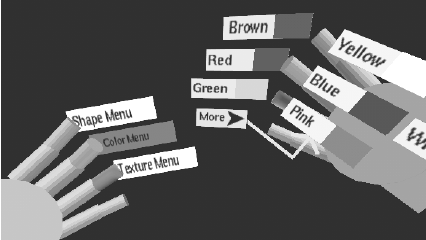
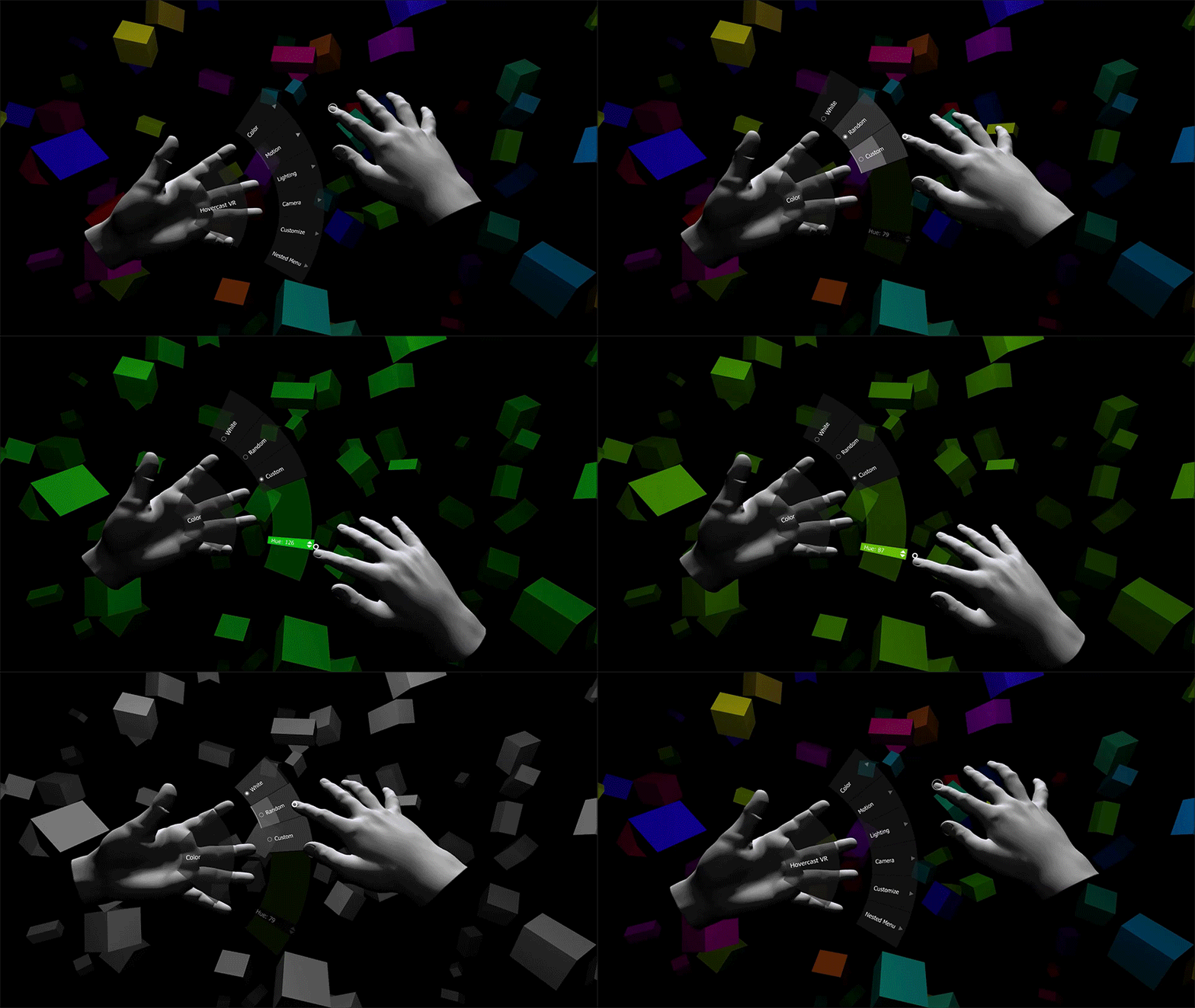
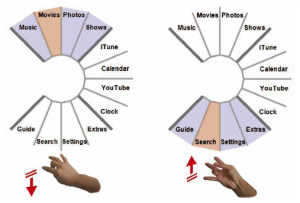
Figures 1, 2 & 3: Examples of menus that were deliberately designed for immersive virtual environments: the TULIP Menu [8] (on the left), Leap Motion’s Hovercast Menu [10] (in the middle) and the rapMenu [11] (on the right).
Guidelines for 3D UI design
Shneiderman, who is also the author of the originator of the Visual Information Seeking Mantra, points out that advanced 3D UI designs are marked by their support of (1) rapid situation awareness through effective overviews, (2) reduced numbers of actions to accomplish tasks, and (3) prompt, meaningful feedback for user actions. He offers the following guidelines for 3D UI design [5]:
- minimizing the number of navigation steps for users to accomplish a task
- concern for readability of text, in particular good contrast with background and minimization of tilt orientation
- avoidance of unnecessary visual clutter
- simplification of user and object movement
- error prevention
- organisation of information or groups of items in structures that allow rapid visual search and enable spatial recall
- enriching interfaces with haptic feedback and audio cues might provide additional benefits
- overviews to provide users with big picture of an application
- permit user actions on objects
- give user control over amount of information, offer details on demand
- implement dynamic queries to rapidly filter out unneeded items
- recognizable and memorable icon designs
Applying these twelve guidelines to the implementation of a 3D UI increases the usability and user experience of a spatial environment.
Application to the Worldmap Data Exploration Prototype
Applying these learnings to the context of our prototype, that has been built on the hypothesis that real user value is created when data is presented in a meaningful way and made accessible for exploration and discovery, notably if the user is able to interact with it, and combining it with the previously presented Visual Information Seeking Mantra “overview first, zoom and filter, then details on demand” which also points out important aspects for interaction with data, leads to the following interaction concepts:
- perspective control: facilitating a mechanism to switch between overview and detail, allowing to shift the user’s perspective back and forth between bird’s eye view (presentation of the dataset as a whole) and ground level view (individual collection item and its surrounding)
- importance of filtering mechanisms: filtering is essential in order to make sense out of large amounts of data, therefore the application should allows to apply various filter combinations such as category, material, technique, purpose, origin, epoche, objects on display in current exhibition, etc. to the dataset
- providing details on demand: allowing to interact with specific data points and displaying additional information for selected items. Further interaction possibilities could include marking favorites or comparing the behavior of multiple selected objects
Concerning interaction control, it is estimated that body referenced controls attached to the handles are the best solution for this use case as they minimize occlusion of view yet remain available anytime and are therefore easy to recall. And for menu design, given the many benefits we came to know through the research above, radial menus should be explored.
In any case, rapid prototyping should be applied and great attention be given to ongoing testing while iteratively devising interactions and menus suitable for the given task.
[1] Joseph J. LaViola, Ernst Kruijff, Ryan P. McMahan, Doug A. Bowman, Ivan Poupyrev (?): „3D User Interfaces – Theory and practice“. Addison-Wesley Educational Publishers Inc, New Jersey, USA.
[2] McMahan, Ryan Patrick (2011): ”Exploring the Effects of Higher-Fidelity Display and Interaction for Virtual Reality Games”. Virginia Polytechnic Institute and State University, Blacksburg, VA.
[3] Russell Owen, Gordon Kurtenbach, George Fitzmaurice, Thomas Baudel, Bill Buxton (2005): “When It Gets More Difficult, Use Both Hands – Exploring Bimanual Curve Manipulation”. GI 2005 Conference proceedings: Graphics Interface Conference, pp. 17-24.
[4] William R. Sherman, Alan B. Craig (2003): “Understanding Virtual Reality”. Morgan Kaufmann Publishers, San Francisco, CA, USA.
[5] Shneiderman, Ben (2003): „Why not make Interfaces better than 3D reality?“. IEEE Computer Graphics and Applications, Volume: 23, Issue 6.
[6] Jacoby, Richard H., Ellis, Stephen (1992): „Using virtual menus in a virtual environment“. Proceedings of SPIE – The International Society for Optical Engineering.
[7] Dachselt, Raimund and Hübner, Anett (2007): “Three-dimensional menus: A survey and taxonomy”, Computers & Graphics, Volume 31, Issue 1, Pages 53-65.
[8] D. A. Bowman and C. A. Wingrave (2001): “Design and evaluation of menu systems for immersive virtual environments”. Proceedings IEEE Virtual Reality 2001, Yokohama, Japan, pp. 149-156.
[9] D. A. Bowman, C. A. Wingrave, J. M. Campbell, V. Q. Ly, C. J. Rhoton (2002): “Novel Uses of Pinch Gloves™ for Virtual Environment Interaction Techniques”. In “Virtual Reality”, Volume 6, Issue 3, pp 122–129. Springer, London, UK.
[10] Kinstner, Zach (2015): “Hovercast VR Menu: Power at Your Fingertips”, URL: http://blog.leapmotion.com/hovercast-vr-menu-power-fingertips
[11] Ni, Tao, McMahan, Ryan, Bowman, Doug (2008): “Tech-note: rapMenu: Remote Menu Selection Using Freehand Gestural Input”. 3DUI – IEEE Symposium on 3D User Interfaces 2008.